Chapter 3 Common Programming Concepts
Variables and Mutability
In Rust, variables are immutable by default.
Using the mut explicitly to make a variable mutable.
Constant
Using the const to declare a constant. Constants are always immutable. And the type of the constant must be annotated.
It can be declared in any scope, including the global scope.
The value of a constant must can be determined at compile time.
Shadowing
Shadowing allows programmer to declare the a new variable with the same name as a previous variable. In that case, we say that the first variable is shadowed by the second.
Here is an example of shadowing and scope.
fn main() {
	let x = 5;
	let x = x + 1;
	{
		let x = x * 2;
		println!("The value of x in the inner scope is: {x}"); // x = 12
	}
	println!("The value of x is: {x}"); // x = 6
}
Comparing to mut, shadowing still keeps the variable immutable. It use let to perform limited transformation among variable but have them immutable after the transformation have completed.
Moreover, it allows us to change the type of the value but reuse the same name.
Data Types
Rust is a statically typed language. The types of all the variables must be known at compile time.
We look into two classes of types, scalar types and compound types.
Scalar Types
A scalar type represent a single value. There four primary scalar types in Rust: integers, float-point numbers, Booleans and characters.
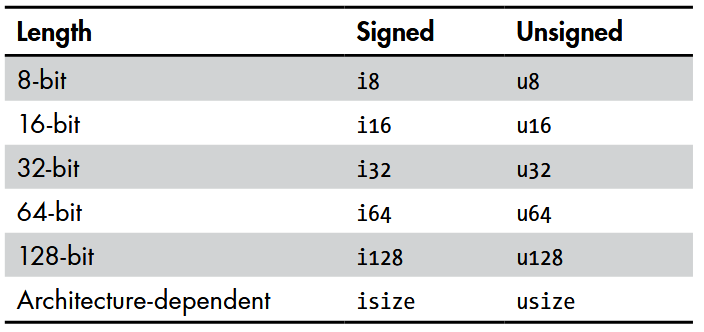
Rust allows us to write integer literals in any of the forms shown in the following image.

Integer Overflow: Rust behaves differently when an integer overflowing happen. When compiling in debug mode, it will throw a panic and exit the program. When compiling in release mode, it will follow the two’s complement wrapping.
Rust support f32 and f64 floating point type, following the IEEE-754 standard.
The default type is f64, since the speed is roughly the same in modern CPUs.
The integer division in Rust is truncated to zero to the nearest integer.
Rust’s Boolean type has true and false two value. They are 1 byte in size.
Rust’s char type is 4 byte in size, representing a Unicode scalar value.
Compound Types
Rust support two primitive compound types: tuples and arrays.
Tuple: A general way to grouping a set of values with possible different types. Its length is fixed at the defining time. Here is an example.
fn main() {
	let tup: (i32, f64, u8) = (500, 6.4, 1);
	let (x, y, z) = tup;
	let five_hundred = tup.0;
	let six_point_four = tup.1;
	let one = tup.2;
	println!("The value of y is: {y}");
}Array: The elements in an array should be same. In Rust, the length of arrays is fixed.
Rust will check whether the index to access a array is valid. If the index is out of the scope, Rust will throw a panic. The checking happens at runtime.
Functions
Rust code uses snake case as the conventional naming style for functions and variables. Rust functions are defined followed the fn keyword.
Rust allows the function’s definition is behind where is is been called. The position is not matter, only the scope is matter. Here is an example.
fn main() {
	println!("Hello, world!");
	another_function();
}
fn another_function() {
	println!("Another function.");
}
Rust asks to declare the type of each parameters of functions.
Rust is an expression-based language. In Rust, statements are instructions that perform some actions and do not return a value; while expressions evaluate to a resultant value.
For example, the let x = (let y = 6); is not allowed, since the let y = 6 is a statement that do not have a returning value.
On the other hand, let x = {let y = 6; y + 1}; is allowed. The expressions do not have a semicolon in the end.
Rust use the right arrow -> to declare the return values of a function.
Control Flow
if Expression
An if expression allows to branch code according to the condition. Here is an example.
fn main() {
	let number = 3;
	if number < 5 {
		println!("condition was true");
	} else {
		println!("condition was false");
	}
}
In Rust, the condition in the if expression must be a bool. Otherwise the compiler will report an error. Rust will not automatically convert non-Boolean types into a Boolean.
For example, we cannot use the if number {... in the upper example.
If you want to handle multiple if arms, Rust allows to use the if {...} else if {...} else {...} structure.
The if is an expression, so we can use it on the right side of let. For example: let x = if condition {5} else {6};
Loop
Rust supports three types of loops: loop, while and for.
loop is an infinitive loop. You can only use the break keyword within the loop to stop the loop execution.
The continue keyword is used to tell the program to skip over any remaining code in this iteration and start a new one.
As same as if, the loop is also an expression which can return a value.
In Rust, we use the break to indicate the return values of a loop. Here is an example.
fn main() {
	let mut counter = 0;
	let result = loop {
		counter += 1;
		if counter == 10 {
			break counter * 2;
		}
	};
	println!("The result is {result}");
}
Rust introduces labels to make handling control flow of multiple nested loops easier.
By default, both the continue and break keyword works for the innermost loop.
To make them work for the outer loop, we can use the loop labels. Here is an example.
fn main() {
	let mut count = 0;
	'counting_up: loop {
		println!("count = {count}");
		let mut remaining = 10;
		loop {
			println!("remaining = {remaining}");
			if remaining == 9 {
				break; // break the inner loop
			}
			if count == 2 {
				break 'counting_up; // break the outer loop
			}
			remaining -= 1;
		}
		count += 1;
	}
	println!("End count = {count}");
}
The while loop is similar. See the following example.
fn main() {
	let mut number = 3;
	while number != 0 {
		println!("{number}!");
		number -= 1;
	}
	println!("LIFTOFF!!!");
}
The for loop in Rust allows a safety method to go through a set of elements. Here is an example.
fn main() {
	let a = [10, 20, 30, 40, 50];
	for element in a {
		println!("the value is: {element}");
	}
}
Or using the Range to count the number explicitly.
fn main() {
	for number in (1..4).rev() {
		println!("{number}!");
	}
	println!("LIFTOFF!!!");
}